STM32MP135F: boot sequence
Introduction
The boot sequence for the STM32MP135F is influenced heavily by its security extensions: OP‑TEE, TF‑A, and U‑Boot. At first it may look complex and intimidating, but once you understand where each part fits, much of the confusion disappears.
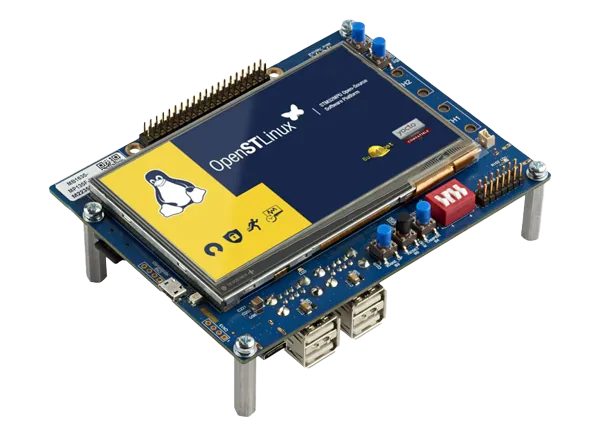
In this article I will walk through how the STM32MP135F boot process works and how it can be customized. Without a further a do, let's go.
Bootchain
The STM32MP135F bootchain may look complicated at first, but each stage plays a very specific role and hands off cleanly to the next one. What initially appears as a tangle of TF‑A, OP‑TEE, and U‑Boot becomes much clearer once you see how the chain flows from the very first instruction executed on the CPU to the point where Linux finally takes over.
It begins with a small set of essential components:
- Trusted firmware A (TF-A): https://trustedfirmware-a.readthedocs.io/en/latest/
- OP‑TEE OS: https://OP‑TEE.readthedocs.io/en/latest/
- U-boot: https://docs.u-boot.org/en/latest/
The boot sequence begins inside the CPU itself. A tiny BootROM routine, permanently stored in the processor, starts running as soon as the chip powers on. Its job is simple: fetch the first‑stage bootloader from ROM (in my case it was SD card), put it in cpu internal RAM (called in docs SRAM) and start it.
The first-stage bootloader is TF‑A (Trusted Firmware‑A). Because TF-A is loaded into cpu internal ram it needs to be tiny (SRAM is limited to 256KB in STM32MP135). Once TF‑A starts, it brings the system to life: it initializes the full clock tree, configures the DDR memory, and prepares the environment for the next secure component. To know how configure clocks and ram TF-A uses it's own device tree file. After RAM is ready, TF‑A loads OP‑TEE into DDR and transfers execution to it. OP‑TEE runs entirely in the secure world, and during its startup it configures a number of security‑critical peripherals such as the RCC, the interrupt controller, the TrustZone controller etc. It uses its own device tree for this, which is completely separate from the one used by TF‑A. After it finishes its secure initialization, OP‑TEE loads the second-stage bootloader into DDR and executes it.
The second-stage bootloader is U‑Boot, which now runs in the non-secure world. U‑Boot reads its own device tree and configures various non‑secure peripherals (for example network card so we can use tftp to load linux image). After its initialization, U‑Boot loads the Linux kernel into RAM and start it.
Looking from memory perspective the booting process look like this:
CPU memory

   |----> ROM Code ----> TF-A ----|
   |                              |
----                              ----
                                     |
                                     |----> OPTEE ----> U-boot ----> Linux

External RAM
It may seem like a surprisingly long chain of steps for something as simple as “boot the system,” but each layer has a clear purpose. Before going further, it helps to understand what an execution level actually is, because this concept explains why the secure and non-secure worlds need separate handling.
When the CPU starts and its registers are initialized, it can switch between different execution contexts. A simple way to picture this is to imagine two programs, program A and program B. Program A might run on execution level 1 and program B on execution level 2. When the CPU switches from level 1 to level 2, it saves the registers belonging to program A and restores the registers that belong to program B. When switching back, the opposite happens. This automatic saving and restoring of context is how the processor keeps each program isolated while allowing execution to move between them.
In stm32mp135f instead level 1 and level 2 we have Secure mode and User mode. When the CPU is in Secure mode it has access to all security‑related peripheral registers. This secure access is required to configure some of peripherals, for example the GIC exposes only a limited set of configuration registers to the non-secure world, while all registers are available in the secure world.
At power-on the CPU begins in secure mode, so TF-A can freely configure all secure peripherals. When TF-A hands off to OP-TEE, execution remains in secure mode. Only after OP-TEE finishes its initialization does it switch the processor into User mode and launch U-Boot. From this point onward two independent programs coexist on the CPU: OP-TEE in the secure world and U-Boot (later Linux) in the non-secure world. If U-Boot or Linux needs to perform a secure operation, it cannot access secure registers directly. Instead it must issue an SMC (Secure Monitor Call), which temporarily switches execution back into the secure world so OP-TEE can handle the request. Each SMC handler is aware that the caller is non-secure, allowing OP-TEE to validate parameters, enforce permissions, and perform any necessary checks before modifying secure registers.
Looking from non-secure, secure boot split looks like this:
Secure world

   |----> ROM Code ----> TF-A ----> Optee ----|
   |                                          |
----                                          -----
                                                  |
                                                  |----> U-boot ----> Linux

Non secure world
When SMC call is performed split looks like this:
Secure world

                       |----> OPTEE ----|
                       |                |
----                ----                ----
   |                |                      |
   |----> Linux ----|                      |----> Linux

Non secure world
Compilation
Compiling the full bootchain must follow a specific order. We begin with OP‑TEE, then build U‑Boot, and finally TF‑A. This order matters because TF‑A needs both the OP‑TEE binary and the U‑Boot binary to assemble the final FIP image. Building TF‑A alone cannot produce a complete or useful bootable image.
Before compiling any of the binaries we need a toolchain, you can download one from here.
U‑Boot
With the toolchain ready, we can move on to building the first user-visible stage of the bootchain. We begin by fetching the U-Boot sources and preparing its configuration:
❯ git clone https://source.denx.de/u-boot/u-boot.git
❯ cd u-boot
❯ git checkout v2024.01
❯ make stm32mp13_defconfig CROSS_COMPILE=<toolchain path>/bin/arm-none-linux-gnueabihf- DEVICE_TREE=stm32mp135f-dk
❯ make -j 4 all CROSS_COMPILE=<toolchain path>/bin/arm-none-linux-gnueabihf-
U‑Boot can be customized through its configuration system. One important option is DEVICE_TREE, which selects the device tree U‑Boot will use when configuring the system. After finishing its initialization, U‑Boot executes a startup script. Customizing this script is common: by setting CONFIG_USE_DEFAULT_ENV_FILE to 1 and pointing CONFIG_DEFAULT_ENV_FILE and CONFIG_ENV_SOURCE_FILE to your custom script, U‑Boot will embed it directly into the final binary and execute it automatically on startup.
U‑Boot can load your bare‑metal program into memory, but that is all it does. If your program uses C, you must manually set up a valid stack pointer. Typically the linker script defines a dedicated region for the stack, and you load the end address of that region into the SP register. Since the stack grows downward, SP must point to the highest valid address.
OPTEE
Once U-Boot is built and ready for integration, the next piece is OP-TEE. Here we pull the OP-TEE OS sources, select the right platform settings, and compile the secure-world firmware:
❯ git clone https://github.com/OP-TEE/optee_os.git
❯ cd optee_os
❯ git checkout 4.6.0
❯ export CROSS_COMPILE=<toolchain path>/bin/arm-none-linux-gnueabihf-
❯ make -j 4 all CROSS_COMPILE=$CROSS_COMPILE CROSS_COMPILE_core=$CROSS_COMPILE CROSS_COMPILE_ta_arm32=$CROSS_COMPILE CFG_USER_TA_TARGETS=ta_arm32 CFG_ARM64_core=n PLATFORM=stm32mp1-135F_DK CFG_TEE_CORE_LOG_LEVEL=1 DEBUG=0 CFG_IN_TREE_EARLY_TAS=trusted_keys/f04a0fe7-1f5d-4b9b-abf7-619b85b4ce8c
OP‑TEE OS is mainly configured through environment variables. Setting DEBUG=1 enables debug mode, and CFG_TEE_CORE_LOG_LEVEL=7 enables full logging. OP‑TEE also relies on its own device tree, provided with CFG_EMBED_DTB_SOURCE_FILE. This file must be placed under core/arch/arm/dts. Be sure to set CFG_EMBED_DTB=y, CFG_STM32MP13=y, and CFG_DRAM_SIZE=0x20000000 so OP‑TEE embeds the correct device tree and is built for the right platform if you choose to customize dt.
TF-A
With both U-Boot and OP-TEE compiled, the final step is generating the Firmware Image Package. TF-A brings everything together, so we now fetch it and build the full FIP bundle:
❯ git clone https://review.trustedfirmware.org/TF-A/trusted-firmware-a.git
❯ cd trusted-firmware-a
❯ git checkout v2.9.0
❯ export CROSS_COMPILE=<toolchain path>/bin/arm-none-linux-gnueabihf-
❯ export OPTEE_DIR=../optee_os/out/arm-plat-stm32mp1/core
❯ make -j 4 all fip CROSS_COMPILE=$CROSS_COMPILE CC="$CROSS_COMPILE"gcc LD="$CROSS_COMPILE"ld BL32=$OPTEE_DIR/tee-header_v2.bin BL32_EXTRA1=$OPTEE_DIR/tee-pager_v2.bin BL32_EXTRA2=$OPTEE_DIR/tee-pageable_v2.bin BL33=../u-boot/u-boot-nodtb.bin BL33_CFG=../u-boot/u-boot.dtb ARM_ARCH_MAJOR=7 ARCH=aarch32 PLAT=stm32mp1 DTB_FILE_NAME=stm32mp135f-dk.dtb AARCH32_SP=optee DEBUG=0 LOG_LEVEL=30 STM32MP15_OPTEE_RSV_SHM=0 STM32MP_EMMC=1 STM32MP_SDMMC=1 STM32MP_RAW_NAND=0 STM32MP_SPI_NAND=0 STM32MP_SPI_NOR=0 STM32MP_USB_PROGRAMMER=1
❯ ls build/stm32mp1/release/
Trusted Firmware‑A is also configured through environment variables. Device tree can be configured via DTB_FILE_NAME variable (remember to set .dtb extension instead of .dts), while DEBUG=1 enables debug mode, LOG_LEVEL=30 controls verbosity (up to a maximum of 50). During its build process TF‑A collects the OP‑TEE and U‑Boot binaries and packages them into a single FIP (Firmware Image Package). The output consists mainly of fip.bin and tf‑a.stm32.
Before flashing these onto an SD card, the card must be prepared with the correct partition layout:
| Partition | Name | Description |
|---|---|---|
| 1 | fsbl1 | First-stage bootloader |
| 2 | fsbl2 | Backup bootloader |
| 3 | fip | Firmware Image Package |
| 4 | rootfs | Root filesystem |
Example commands:
❯ sudo sgdisk -o /dev/sda
❯ sudo sgdisk --resize-table=128      \
            -a 1 -n 1:34:545          \
            -c 1:fsbl1                \
            -n 2:546:1057             \
            -c 2:fsbl2                \
            -n 3:1058:9249            \
            -c 3:fip                  \
            -n 4:9250:                \
            -c 4:rootfs               \
            -A 4:set:2                \
            -p /dev/sda
After preparing the partition table, the binaries can be written using dd:
❯ sudo dd if=build/stm32mp1/release/tf-a-stm32mp135f-dk.stm32 of=/dev/disk/by-partlabel/fsbl1 bs=1K conv=fsync
❯ sudo dd if=build/stm32mp1/release/tf-a-stm32mp135f-dk.stm32 of=/dev/disk/by-partlabel/fsbl2 bs=1K conv=fsync
❯ sudo dd if=build/stm32mp1/release/fip.bin of=/dev/disk/by-partlabel/fip bs=1K conv=fsync
Conclusions
The STM32MP135F bootchain is made up of several tightly connected components, each responsible for preparing the system for the next one. Once the secure and non‑secure split becomes clear, the entire flow feels much more logical. With this understanding in place, you are ready to move on to more advanced work: modifying TF‑A, extending OP‑TEE, customizing U‑Boot, or building software that runs early in the boot sequence.
Grasping the secure and nonsecure split takes a while but in this article we layed out the basics which should prepare you for more advanced tasks.
For practical example of configuring the bootchain on STM32MP135F check out my github repo.