Memory layout
Introduction
We usually think about memory addresses in relation to pointers, it is pretty obvious to anyone that since malloc allocates memory it has to have some address, rigth?
char *ptr = malloc(1024);
printf("%p\n", ptr);
But besides dynamically allocated memory even the stack allocated memory has it's own addresses range:
char *ptr = "KubaTaba1uga";
printf("%p\n", ptr);
The memory for malloc is allocated on the heap where stack allocated memory is allocated well, on stack. Memory allocated on heap is in different region of process virtual memory than stack. Beside stack and heap there are more memory regions available to Linux developer, in this article we will do the deep dive into how memory is presented on linux and how C developer can affect the memory layout. Because the subject is pretty complicated we will split our exploration into few parts:
- ELF file format
- Compilation And Linkage of ELF executable
- Default memory layout
- Memory layout customization
Without further a do, let's start.
Objdump and readelf usage
Along the article we will be using some objdump commands so here is summary for them:
objdump -t <file> - show symbols table of object file
objdump -h <file> - show sections of object file
objdump -p <file> - show program headers of object file
objdump -d <file> - show assembly of object file
readelf -a <file> - show ELF header of object file
realdef -l <file> - show detailed sections info
ELF file format
The main executable format on Linux is ELF (Executable and Linkable Format). In this part we will discuss how elf format looks like and how it works like, after this part you should be able to explain what is structure of ELF file and how looks ELF file lifetime cycle.
The ELF file comes in one of three types:
- A relocatable file that holds code and data suitable for linking with other object files to create an executable or a shared object file. Example of this file is foo.o.
- An executable file holds a program suitable for execution. Example of this file is foo.
- A shared object file that is much like relocatable file but allow for dynamic linking in runtime from multiple processes. It's better known as so file, it's example is foo.so.
In this article we focuse on creation of executable file, so for the moment third type can be disregarded.
The flow for creating an executable looks like this:
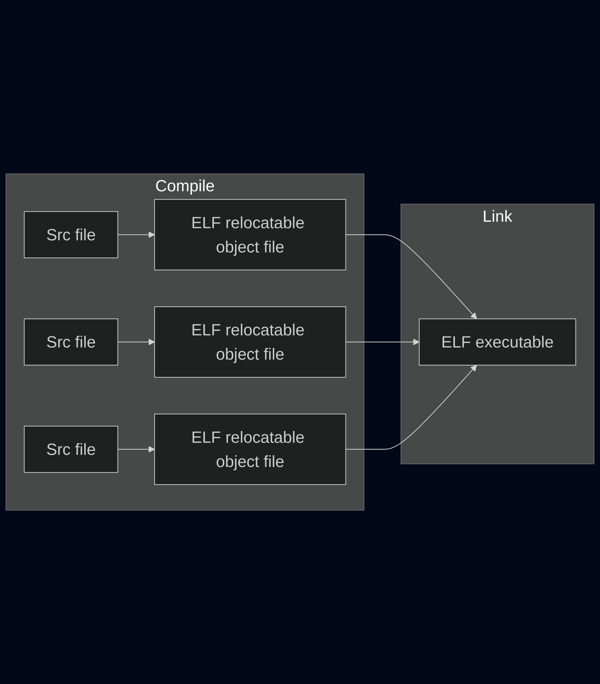
For example purposes let's create a file foo.c and transform it into executable:
// foo.c

int populated = 1;
int not_populated;

int main(){
    populated = 7;
    not_populated = 0;

    return 0;
}
When we want to create an executable for foo.c we needs to create a relocatable file first:
❯ gcc -c foo.c -o foo.o
Relocatable file structure is composed of ELF header and sections:
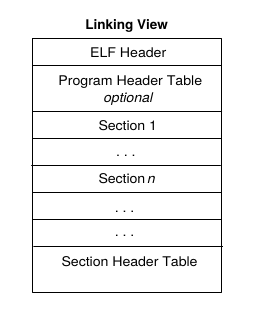
ELF header specify metadata required to interpet the object file, for example a type of an object file (whether it is relocatable, executable or so):
❯ readelf -h foo.o
ELF Header:
  Magic:   7f 45 4c 46 02 01 01 00 00 00 00 00 00 00 00 00
  Class:                             ELF64
  Data:                              2's complement, little endian
  Version:                           1 (current)
  OS/ABI:                            UNIX - System V
  ABI Version:                       0
  Type:                              REL (Relocatable file)
  Machine:                           Advanced Micro Devices X86-64
  Version:                           0x1
  Entry point address:               0x0
  Start of program headers:          0 (bytes into file)
  Start of section headers:          536 (bytes into file)
  Flags:                             0x0
  Size of this header:               64 (bytes)
  Size of program headers:           0 (bytes)
  Number of program headers:         0
  Size of section headers:           64 (bytes)
  Number of section headers:         12
  Section header string table index: 11
While each section specify memory region of object file and it's settings:
❯ objdump -h foo.o

foo.o:     file format elf64-x86-64

Sections:
Idx Name          Size      VMA               LMA               File off  Algn
  0 .text         0000001f  0000000000000000  0000000000000000  00000040  2**0
                  CONTENTS, ALLOC, LOAD, RELOC, READONLY, CODE
  1 .data         00000004  0000000000000000  0000000000000000  00000060  2**2
                  CONTENTS, ALLOC, LOAD, DATA
  2 .bss          00000004  0000000000000000  0000000000000000  00000064  2**2
                  ALLOC
  3 .comment      00000020  0000000000000000  0000000000000000  00000064  2**0
                  CONTENTS, READONLY
  4 .note.GNU-stack 00000000  0000000000000000  0000000000000000  00000084  2**0
                  CONTENTS, READONLY
  5 .eh_frame     00000038  0000000000000000  0000000000000000  00000088  2**3
                  CONTENTS, ALLOC, LOAD, RELOC, READONLY, DATA
Each section stands for some memory region, for example text spawn from 0x00 till 0x40 and has enabled CONTENTS, ALLOC, LOAD, RELOC, READONLY, CODE.
Each of these settings is indirectly derived from ELF specification. For example ELF specification doesn't specify READONLY flag, but it specify SHF_WRITE flag which lack of can be interpreted as READONLY feature enabled. The settings of an section describe how it will behave during runetime. So for example .text section can't be modified, so linker can put there all string literals, hence .data does not have write protection it may not be good idea to put string literals there.
Beside program header and sections each object file has it's symbol table which specify all functions and variables which have to be allocated upfront in any of sections. Symbol table is optionall and can be stripped so it can't be reliad upon, however this is nice to know for all debugging related tasks:
❯ objdump -t foo.o

foo.o:     file format elf64-x86-64

SYMBOL TABLE:
0000000000000000 l    df *ABS*  0000000000000000 foo.c
0000000000000000 l    d  .text  0000000000000000 .text
0000000000000000 g     O .data  0000000000000004 populated
0000000000000000 g     O .bss   0000000000000004 not_populated
0000000000000000 g     F .text  000000000000001f main
The populated variable is put in .data section because of it's LOAD feature, LOAD enables loading value of the memory from object file into a memory, hence populated has assigned value 1 during compilation the runtime will want to take 1 from object file and put it into memory automatically.
The not_populated variable is put in .bss section because it doesn't have a value assigned until main execution, so we need to allocate some memory for it but we do not need to load any value to it.
Once we have relocatable file we are ready to generate executable based on it:
❯ gcc foo.o -o foo
Executable file structure is composed of ELF header, program headers and sections:
ELF header has the same role as in relocable object file, it specify metadata required for handling ELF file:
❯ readelf -a foo
ELF Header:
  Magic:   7f 45 4c 46 02 01 01 00 00 00 00 00 00 00 00 00
  Class:                             ELF64
  Data:                              2's complement, little endian
  Version:                           1 (current)
  OS/ABI:                            UNIX - System V
  ABI Version:                       0
  Type:                              DYN (Position-Independent Executable file)
  Machine:                           Advanced Micro Devices X86-64
  Version:                           0x1
  Entry point address:               0x1040
  Start of program headers:          64 (bytes into file)
  Start of section headers:          13976 (bytes into file)
  Flags:                             0x0
  Size of this header:               64 (bytes)
  Size of program headers:           56 (bytes)
  Number of program headers:         14
  Size of section headers:           64 (bytes)
  Number of section headers:         30
  Section header string table index: 29
Each program header contains metadata important for loading the section into memory:
❯ objdump -p main

main:     file format elf64-x86-64

Program Header:
    PHDR off    0x0000000000000040 vaddr 0x0000000000000040 paddr 0x0000000000000040 align 2**3
         filesz 0x0000000000000310 memsz 0x0000000000000310 flags r--
  INTERP off    0x0000000000000394 vaddr 0x0000000000000394 paddr 0x0000000000000394 align 2**0
         filesz 0x000000000000001c memsz 0x000000000000001c flags r--
    LOAD off    0x0000000000000000 vaddr 0x0000000000000000 paddr 0x0000000000000000 align 2**12
         filesz 0x00000000000005f0 memsz 0x00000000000005f0 flags r--
    LOAD off    0x0000000000001000 vaddr 0x0000000000001000 paddr 0x0000000000001000 align 2**12
         filesz 0x0000000000000151 memsz 0x0000000000000151 flags r-x
    LOAD off    0x0000000000002000 vaddr 0x0000000000002000 paddr 0x0000000000002000 align 2**12
         filesz 0x00000000000000fc memsz 0x00000000000000fc flags r--
    LOAD off    0x0000000000002e00 vaddr 0x0000000000003e00 paddr 0x0000000000003e00 align 2**12
         filesz 0x0000000000000214 memsz 0x0000000000000220 flags rw-
 DYNAMIC off    0x0000000000002e10 vaddr 0x0000000000003e10 paddr 0x0000000000003e10 align 2**3
         filesz 0x00000000000001b0 memsz 0x00000000000001b0 flags rw-
    NOTE off    0x0000000000000350 vaddr 0x0000000000000350 paddr 0x0000000000000350 align 2**3
         filesz 0x0000000000000020 memsz 0x0000000000000020 flags r--
    NOTE off    0x0000000000000370 vaddr 0x0000000000000370 paddr 0x0000000000000370 align 2**2
         filesz 0x0000000000000024 memsz 0x0000000000000024 flags r--
    NOTE off    0x00000000000020dc vaddr 0x00000000000020dc paddr 0x00000000000020dc align 2**2
         filesz 0x0000000000000020 memsz 0x0000000000000020 flags r--
0x6474e553 off    0x0000000000000350 vaddr 0x0000000000000350 paddr 0x0000000000000350 align 2**3
         filesz 0x0000000000000020 memsz 0x0000000000000020 flags r--
EH_FRAME off    0x0000000000002004 vaddr 0x0000000000002004 paddr 0x0000000000002004 align 2**2
         filesz 0x000000000000002c memsz 0x000000000000002c flags r--
   STACK off    0x0000000000000000 vaddr 0x0000000000000000 paddr 0x0000000000000000 align 2**4
         filesz 0x0000000000000000 memsz 0x0000000000000000 flags rw-
   RELRO off    0x0000000000002e00 vaddr 0x0000000000003e00 paddr 0x0000000000003e00 align 2**0
         filesz 0x0000000000000200 memsz 0x0000000000000200 flags r--
Notice the range inside header, for first header one we have start at offset at 0x0040 and end at 0x0350=0x0040+0x0310 which we can calculate from offset and size.
We can confirm that first header ranging from 0x0040 till 0x0350 does not have any matching section:
❯ objdump -h foo

main:     file format elf64-x86-64

Sections:
Idx Name          Size      VMA               LMA               File off  Algn
  0 .note.gnu.property 00000020  0000000000000350  0000000000000350  00000350  2**3
                  CONTENTS, ALLOC, LOAD, READONLY, DATA
  1 .note.gnu.build-id 00000024  0000000000000370  0000000000000370  00000370  2**2
                  CONTENTS, ALLOC, LOAD, READONLY, DATA
  2 .interp       0000001c  0000000000000394  0000000000000394  00000394  2**0
                  CONTENTS, ALLOC, LOAD, READONLY, DATA
  3 .gnu.hash     00000024  00000000000003b0  00000000000003b0  000003b0  2**3
                  CONTENTS, ALLOC, LOAD, READONLY, DATA
  4 .dynsym       00000090  00000000000003d8  00000000000003d8  000003d8  2**3
                  CONTENTS, ALLOC, LOAD, READONLY, DATA
  5 .dynstr       00000088  0000000000000468  0000000000000468  00000468  2**0
                  CONTENTS, ALLOC, LOAD, READONLY, DATA
  6 .gnu.version  0000000c  00000000000004f0  00000000000004f0  000004f0  2**1
                  CONTENTS, ALLOC, LOAD, READONLY, DATA
  7 .gnu.version_r 00000030  0000000000000500  0000000000000500  00000500  2**3
                  CONTENTS, ALLOC, LOAD, READONLY, DATA
  8 .rela.dyn     000000c0  0000000000000530  0000000000000530  00000530  2**3
                  CONTENTS, ALLOC, LOAD, READONLY, DATA
  9 .init         00000017  0000000000001000  0000000000001000  00001000  2**2
                  CONTENTS, ALLOC, LOAD, READONLY, CODE
 10 .plt          00000010  0000000000001020  0000000000001020  00001020  2**4
                  CONTENTS, ALLOC, LOAD, READONLY, CODE
 11 .plt.got      00000008  0000000000001030  0000000000001030  00001030  2**3
                  CONTENTS, ALLOC, LOAD, READONLY, CODE
 12 .text         00000108  0000000000001040  0000000000001040  00001040  2**4
                  CONTENTS, ALLOC, LOAD, READONLY, CODE
 13 .fini         00000009  0000000000001148  0000000000001148  00001148  2**2
                  CONTENTS, ALLOC, LOAD, READONLY, CODE
 14 .rodata       00000004  0000000000002000  0000000000002000  00002000  2**2
                  CONTENTS, ALLOC, LOAD, READONLY, DATA
 15 .eh_frame_hdr 0000002c  0000000000002004  0000000000002004  00002004  2**2
                  CONTENTS, ALLOC, LOAD, READONLY, DATA
 16 .eh_frame     000000ac  0000000000002030  0000000000002030  00002030  2**3
                  CONTENTS, ALLOC, LOAD, READONLY, DATA
 17 .note.ABI-tag 00000020  00000000000020dc  00000000000020dc  000020dc  2**2
                  CONTENTS, ALLOC, LOAD, READONLY, DATA
 18 .init_array   00000008  0000000000003e00  0000000000003e00  00002e00  2**3
                  CONTENTS, ALLOC, LOAD, DATA
 19 .fini_array   00000008  0000000000003e08  0000000000003e08  00002e08  2**3
                  CONTENTS, ALLOC, LOAD, DATA
 20 .dynamic      000001b0  0000000000003e10  0000000000003e10  00002e10  2**3
                  CONTENTS, ALLOC, LOAD, DATA
 21 .got          00000028  0000000000003fc0  0000000000003fc0  00002fc0  2**3
                  CONTENTS, ALLOC, LOAD, DATA
 22 .got.plt      00000018  0000000000003fe8  0000000000003fe8  00002fe8  2**3
                  CONTENTS, ALLOC, LOAD, DATA
 23 .data         00000014  0000000000004000  0000000000004000  00003000  2**3
                  CONTENTS, ALLOC, LOAD, DATA
 24 .bss          0000000c  0000000000004014  0000000000004014  00003014  2**2
                  ALLOC
 25 .comment      0000001f  0000000000000000  0000000000000000  00003014  2**0
                  CONTENTS, READONLY
But second one does have one match, it start is at 0x0000000000000394 and it's end is at 0x0411=0x0394 + 0x01c, this section is .interp. We are lucky because we do not need to compare all sections and program headers like this, there is already tool which can do the job for us:
❯ readelf -l  main

Elf file type is DYN (Position-Independent Executable file)
Entry point 0x1040
There are 14 program headers, starting at offset 64

Program Headers:
  Type           Offset             VirtAddr           PhysAddr
                 FileSiz            MemSiz              Flags  Align
  PHDR           0x0000000000000040 0x0000000000000040 0x0000000000000040
                 0x0000000000000310 0x0000000000000310  R      0x8
  INTERP         0x0000000000000394 0x0000000000000394 0x0000000000000394
                 0x000000000000001c 0x000000000000001c  R      0x1
      [Requesting program interpreter: /lib64/ld-linux-x86-64.so.2]
  LOAD           0x0000000000000000 0x0000000000000000 0x0000000000000000
                 0x00000000000005f0 0x00000000000005f0  R      0x1000
  LOAD           0x0000000000001000 0x0000000000001000 0x0000000000001000
                 0x0000000000000151 0x0000000000000151  R E    0x1000
  LOAD           0x0000000000002000 0x0000000000002000 0x0000000000002000
                 0x00000000000000fc 0x00000000000000fc  R      0x1000
  LOAD           0x0000000000002e00 0x0000000000003e00 0x0000000000003e00
                 0x0000000000000214 0x0000000000000220  RW     0x1000
  DYNAMIC        0x0000000000002e10 0x0000000000003e10 0x0000000000003e10
                 0x00000000000001b0 0x00000000000001b0  RW     0x8
  NOTE           0x0000000000000350 0x0000000000000350 0x0000000000000350
                 0x0000000000000020 0x0000000000000020  R      0x8
  NOTE           0x0000000000000370 0x0000000000000370 0x0000000000000370
                 0x0000000000000024 0x0000000000000024  R      0x4
  NOTE           0x00000000000020dc 0x00000000000020dc 0x00000000000020dc
                 0x0000000000000020 0x0000000000000020  R      0x4
  GNU_PROPERTY   0x0000000000000350 0x0000000000000350 0x0000000000000350
                 0x0000000000000020 0x0000000000000020  R      0x8
  GNU_EH_FRAME   0x0000000000002004 0x0000000000002004 0x0000000000002004
                 0x000000000000002c 0x000000000000002c  R      0x4
  GNU_STACK      0x0000000000000000 0x0000000000000000 0x0000000000000000
                 0x0000000000000000 0x0000000000000000  RW     0x10
  GNU_RELRO      0x0000000000002e00 0x0000000000003e00 0x0000000000003e00
                 0x0000000000000200 0x0000000000000200  R      0x1

 Section to Segment mapping:
  Segment Sections...
   00
   01     .interp
   02     .note.gnu.property .note.gnu.build-id .interp .gnu.hash .dynsym .dynstr .gnu.version .gnu.version_r .rela.dyn
   03     .init .plt .plt.got .text .fini
   04     .rodata .eh_frame_hdr .eh_frame .note.ABI-tag
   05     .init_array .fini_array .dynamic .got .got.plt .data .bss
   06     .dynamic
   07     .note.gnu.property
   08     .note.gnu.build-id
   09     .note.ABI-tag
   10     .note.gnu.property
   11     .eh_frame_hdr
   12
   13     .init_array .fini_array .dynamic .got .got.plt
The ranges from program headers create a segments of memory, into which sections are mapped to. From now on we will refer to the ranges from program headers as segments.
Ok so at this moment you should have pretty well understanding of how the ELF object files look on the disk, so it's time to move on to the next subject Compilation And Linkage of ELF executable. How is it actually happening that our c src code ends up as relocatable object file? And how it is possible that multiple relocatable files can compose an executable?
Compilation And Linkage of ELF executable
Let's consider a problem, how is it happening that our foo.c ends up as foo.o with all this ELF header and sections and assembly inside?
Compiler is our main friend here and he will do all the job in producing the foo.o. The flow looks sth like this:
C src file ----> Preprocessor file -----> Assembly ------> ELF relocatable file

C src file ----> Preprocessor file -----> Assembly ------> ELF relocatable file

C src file ----> Preprocessor file -----> Assembly ------> ELF relocatable file
First we need to expand all preprocessor directives in our c file:
❯ gcc -E foo.c -o foo.i
Then translate preprocessor file into assembly:
❯ gcc -S foo.i -o foo.s
And the last step is packaging assembly into ELF format:
❯ gcc -c foo.s -o foo.o
Once we have an ELF relocatable file we can use linker to link it into ELF executable file:
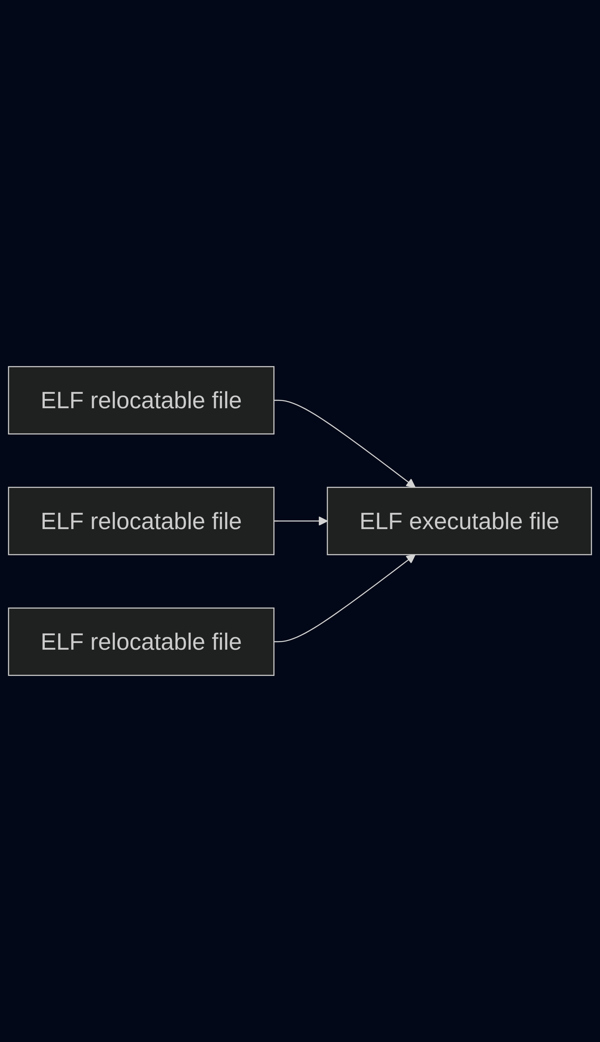
ld -o foo -I /usr/lib/x86_64-linux-gnu/ld-linux-x86-64.so.2 /usr/lib/x86_64-linux-gnu/crt1.o /usr/lib/x86_64-linux-gnu/crti.o -lc foo.o /usr/lib/x86_64-linux-gnu/crtn.o
The exact location of other .o files can differ from system to system, they can be find like easilly like this:
sudo find / | grep -E ".*(ld-linux-x86-64.so.2|crt1.o|crti.o|crtn.o)"
If we examine foo we will see almost the the same sections and program headers as before:
❯ readelf -l  foo

Elf file type is EXEC (Executable file)
Entry point 0x401020
There are 12 program headers, starting at offset 64

Program Headers:
  Type           Offset             VirtAddr           PhysAddr
                 FileSiz            MemSiz              Flags  Align
  PHDR           0x0000000000000040 0x0000000000400040 0x0000000000400040
                 0x00000000000002a0 0x00000000000002a0  R      0x8
  INTERP         0x00000000000002e0 0x00000000004002e0 0x00000000004002e0
                 0x000000000000002f 0x000000000000002f  R      0x1
      [Requesting program interpreter: /usr/lib/x86_64-linux-gnu/ld-linux-x86-64.so.2]
  LOAD           0x0000000000000000 0x0000000000400000 0x0000000000400000
                 0x0000000000000408 0x0000000000000408  R      0x1000
  LOAD           0x0000000000001000 0x0000000000401000 0x0000000000401000
                 0x0000000000000079 0x0000000000000079  R E    0x1000
  LOAD           0x0000000000002000 0x0000000000402000 0x0000000000402000
                 0x00000000000000c0 0x00000000000000c0  R      0x1000
  LOAD           0x0000000000002e88 0x0000000000403e88 0x0000000000403e88
                 0x0000000000000180 0x0000000000000188  RW     0x1000
  DYNAMIC        0x0000000000002e88 0x0000000000403e88 0x0000000000403e88
                 0x0000000000000150 0x0000000000000150  RW     0x8
  NOTE           0x0000000000002080 0x0000000000402080 0x0000000000402080
                 0x0000000000000020 0x0000000000000020  R      0x8
  NOTE           0x00000000000020a0 0x00000000004020a0 0x00000000004020a0
                 0x0000000000000020 0x0000000000000020  R      0x4
  GNU_PROPERTY   0x0000000000002080 0x0000000000402080 0x0000000000402080
                 0x0000000000000020 0x0000000000000020  R      0x8
  GNU_STACK      0x0000000000000000 0x0000000000000000 0x0000000000000000
                 0x0000000000000000 0x0000000000000000  RW     0x10
  GNU_RELRO      0x0000000000002e88 0x0000000000403e88 0x0000000000403e88
                 0x0000000000000178 0x0000000000000178  R      0x1

 Section to Segment mapping:
  Segment Sections...
   00
   01     .interp
   02     .interp .gnu.hash .dynsym .dynstr .gnu.version .gnu.version_r .rela.dyn
   03     .init .text .fini
   04     .rodata .eh_frame .note.gnu.property .note.ABI-tag
   05     .dynamic .got .got.plt .data .bss
   06     .dynamic
   07     .note.gnu.property
   08     .note.ABI-tag
   09     .note.gnu.property
   10
   11     .dynamic .got .got.plt
So how is this possible that the same src code created two different program headers and sections?
Theere is one more piece of the puzzle, the linker script. Once the compiler created the foo.o there is no difference wheter it comes from assembly and preprocessor or from src c file, but when we are linking realocable ELF files together the linker lay out sections and program headers according to a script, we didn't saw it previously using ld because ld has it's own default linking script which it uses if we won't provide our own. To display default linker script do:
ld --verbose
Most linux programs on servers and desktops uses the default linker script and creates bunch of special sections like .bss, .data, .text which are described further in ELF specification 1.2, chapter Special Sections.
But in embedded programming as well as in low-level linux apps you can find custom linker scripts which changes the default layout of the memory segments. By providing your custom linker script you can abandon special sections as well as specify your own sections, we will explore such cases in Memory layout customization chapter but for now let's focus on default memory layout provided by default linker script.
Default memory layout
Linux allows each process to have its own private address space, rather than accessing raw physical RAM directly. It is implemented by virtual memory abstraction which does correspond indirectly to physical RAM adresses:
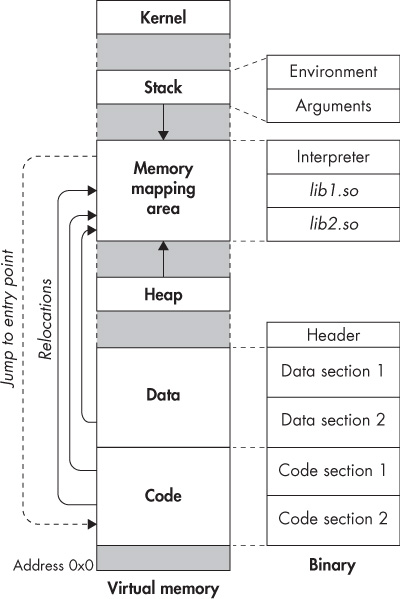
Virtual memory is represented as a continuous chunk of bytes, each with a unique address, starting from a fixed base address.
We learned in previous chapter about memory segments which are composed from multiple section of ELF object file, here these segments are represented on diagram as code and data but there can be more.
Beside special data segments virtual memory contain segment for heap and stack. Heap is used for dynamically allocated memory (e.g., via malloc, calloc, or realloc) and grows upward at runtime as needed. Stack stores local variables, function parameters, return addresses, and saved registers and grows downward as functions are called.
Let's consider example which shows the virtual memory in practice. Imagine two variables a which is a const and b which is not a const, both are global variables:
// foo.c
#include <stdio.h>

const int a = 1;
int b = 2;

int main(void) {
  printf("main=%p\n", main);
  printf("a=%p\n", &a);
  printf("b=%p\n", &b);

  return 0;
}
Compile with:
❯ gcc -no-pie foo.c -o foo
Example output:
❯ ./foo
main=0x401126
a=0x402004
b=0x404018
If we examine symbols of the executable we see we can see that a is in .rodata and b is in .data:
❯ objdump -t foo

foo:     file format elf64-x86-64

SYMBOL TABLE:
0000000000000000 l    df *ABS*  0000000000000000              Scrt1.o
00000000000020fc l     O .note.ABI-tag  0000000000000020              __abi_tag
0000000000000000 l    df *ABS*  0000000000000000              crtstuff.c
0000000000001080 l     F .text  0000000000000000              deregister_tm_clones
00000000000010b0 l     F .text  0000000000000000              register_tm_clones
00000000000010f0 l     F .text  0000000000000000              __do_global_dtors_aux
000000000000401c l     O .bss   0000000000000001              completed.0
0000000000003dd8 l     O .fini_array    0000000000000000              __do_global_dtors_aux_fini_array_entry
0000000000001130 l     F .text  0000000000000000              frame_dummy
0000000000003dd0 l     O .init_array    0000000000000000              __frame_dummy_init_array_entry
0000000000000000 l    df *ABS*  0000000000000000              foo.c
0000000000000000 l    df *ABS*  0000000000000000              crtstuff.c
00000000000020f8 l     O .eh_frame      0000000000000000              __FRAME_END__
0000000000000000 l    df *ABS*  0000000000000000
0000000000003de0 l     O .dynamic       0000000000000000              _DYNAMIC
0000000000002020 l       .eh_frame_hdr  0000000000000000              __GNU_EH_FRAME_HDR
0000000000003fe8 l     O .got.plt       0000000000000000              _GLOBAL_OFFSET_TABLE_
0000000000000000       F *UND*  0000000000000000              __libc_start_main@GLIBC_2.34
0000000000000000  w      *UND*  0000000000000000              _ITM_deregisterTMCloneTable
0000000000004008  w      .data  0000000000000000              data_start
0000000000004018 g     O .data  0000000000000004              b
000000000000401c g       .data  0000000000000000              _edata
00000000000011a0 g     F .fini  0000000000000000              .hidden _fini
0000000000000000       F *UND*  0000000000000000              printf@GLIBC_2.2.5
0000000000004008 g       .data  0000000000000000              __data_start
0000000000000000  w      *UND*  0000000000000000              __gmon_start__
0000000000004010 g     O .data  0000000000000000              .hidden __dso_handle
0000000000002000 g     O .rodata        0000000000000004              _IO_stdin_used
0000000000004020 g       .bss   0000000000000000              _end
0000000000001050 g     F .text  0000000000000022              _start
0000000000002004 g     O .rodata        0000000000000004              a
000000000000401c g       .bss   0000000000000000              __bss_start
0000000000001139 g     F .text  0000000000000065              main
0000000000004020 g     O .data  0000000000000000              .hidden __TMC_END__
0000000000000000  w      *UND*  0000000000000000              _ITM_registerTMCloneTable
0000000000000000  w    F *UND*  0000000000000000              __cxa_finalize@GLIBC_2.2.5
0000000000001000 g     F .init  0000000000000000              .hidden _init
.rodata is a section without a wrote permission but .data is not read only:
❯ objdump -h foo

foo:     file format elf64-x86-64

Sections:
Idx Name          Size      VMA               LMA               File off  Algn
  0 .note.gnu.property 00000020  0000000000000350  0000000000000350  00000350  2**3
                  CONTENTS, ALLOC, LOAD, READONLY, DATA
  1 .note.gnu.build-id 00000024  0000000000000370  0000000000000370  00000370  2**2
                  CONTENTS, ALLOC, LOAD, READONLY, DATA
  2 .interp       0000001c  0000000000000394  0000000000000394  00000394  2**0
                  CONTENTS, ALLOC, LOAD, READONLY, DATA
  3 .gnu.hash     00000024  00000000000003b0  00000000000003b0  000003b0  2**3
                  CONTENTS, ALLOC, LOAD, READONLY, DATA
  4 .dynsym       000000a8  00000000000003d8  00000000000003d8  000003d8  2**3
                  CONTENTS, ALLOC, LOAD, READONLY, DATA
  5 .dynstr       0000008f  0000000000000480  0000000000000480  00000480  2**0
                  CONTENTS, ALLOC, LOAD, READONLY, DATA
  6 .gnu.version  0000000e  0000000000000510  0000000000000510  00000510  2**1
                  CONTENTS, ALLOC, LOAD, READONLY, DATA
  7 .gnu.version_r 00000030  0000000000000520  0000000000000520  00000520  2**3
                  CONTENTS, ALLOC, LOAD, READONLY, DATA
  8 .rela.dyn     000000c0  0000000000000550  0000000000000550  00000550  2**3
                  CONTENTS, ALLOC, LOAD, READONLY, DATA
  9 .rela.plt     00000018  0000000000000610  0000000000000610  00000610  2**3
                  CONTENTS, ALLOC, LOAD, READONLY, DATA
 10 .init         00000017  0000000000001000  0000000000001000  00001000  2**2
                  CONTENTS, ALLOC, LOAD, READONLY, CODE
 11 .plt          00000020  0000000000001020  0000000000001020  00001020  2**4
                  CONTENTS, ALLOC, LOAD, READONLY, CODE
 12 .plt.got      00000008  0000000000001040  0000000000001040  00001040  2**3
                  CONTENTS, ALLOC, LOAD, READONLY, CODE
 13 .text         0000014e  0000000000001050  0000000000001050  00001050  2**4
                  CONTENTS, ALLOC, LOAD, READONLY, CODE
 14 .fini         00000009  00000000000011a0  00000000000011a0  000011a0  2**2
                  CONTENTS, ALLOC, LOAD, READONLY, CODE
 15 .rodata       0000001d  0000000000002000  0000000000002000  00002000  2**2
                  CONTENTS, ALLOC, LOAD, READONLY, DATA
 16 .eh_frame_hdr 0000002c  0000000000002020  0000000000002020  00002020  2**2
                  CONTENTS, ALLOC, LOAD, READONLY, DATA
 17 .eh_frame     000000ac  0000000000002050  0000000000002050  00002050  2**3
                  CONTENTS, ALLOC, LOAD, READONLY, DATA
 18 .note.ABI-tag 00000020  00000000000020fc  00000000000020fc  000020fc  2**2
                  CONTENTS, ALLOC, LOAD, READONLY, DATA
 19 .init_array   00000008  0000000000003dd0  0000000000003dd0  00002dd0  2**3
                  CONTENTS, ALLOC, LOAD, DATA
 20 .fini_array   00000008  0000000000003dd8  0000000000003dd8  00002dd8  2**3
                  CONTENTS, ALLOC, LOAD, DATA
 21 .dynamic      000001e0  0000000000003de0  0000000000003de0  00002de0  2**3
                  CONTENTS, ALLOC, LOAD, DATA
 22 .got          00000028  0000000000003fc0  0000000000003fc0  00002fc0  2**3
                  CONTENTS, ALLOC, LOAD, DATA
 23 .got.plt      00000020  0000000000003fe8  0000000000003fe8  00002fe8  2**3
                  CONTENTS, ALLOC, LOAD, DATA
 24 .data         00000014  0000000000004008  0000000000004008  00003008  2**3
                  CONTENTS, ALLOC, LOAD, DATA
 25 .bss          00000004  000000000000401c  000000000000401c  0000301c  2**0
                  ALLOC
 26 .comment      0000001f  0000000000000000  0000000000000000  0000301c  2**0
                  CONTENTS, READONLY
a is placed in .rodata section, next to the section we can see READONLY feature, which make it perfectly soutable for const variable.
b is placed in .data section we do not have READONLY feature enabled there, making it better suited for modifiable variable.
So far so good, we should understand up to this point how const keyword can affect section that variable is assigned to, but let's do not forget that each section and variable will be eventually mapped to a memory segment when the program will be executed, so let's see segments that our variables end up in:
❯ readelf -l foo

Elf file type is EXEC (Executable file)
Entry point 0x401040
There are 14 program headers, starting at offset 64

Program Headers:
  Type           Offset             VirtAddr           PhysAddr
                 FileSiz            MemSiz              Flags  Align
  PHDR           0x0000000000000040 0x0000000000400040 0x0000000000400040
                 0x0000000000000310 0x0000000000000310  R      0x8
  INTERP         0x0000000000000394 0x0000000000400394 0x0000000000400394
                 0x000000000000001c 0x000000000000001c  R      0x1
      [Requesting program interpreter: /lib64/ld-linux-x86-64.so.2]
  LOAD           0x0000000000000000 0x0000000000400000 0x0000000000400000
                 0x0000000000000500 0x0000000000000500  R      0x1000
  LOAD           0x0000000000001000 0x0000000000401000 0x0000000000401000
                 0x0000000000000195 0x0000000000000195  R E    0x1000
  LOAD           0x0000000000002000 0x0000000000402000 0x0000000000402000
                 0x0000000000000114 0x0000000000000114  R      0x1000
  LOAD           0x0000000000002df8 0x0000000000403df8 0x0000000000403df8
                 0x0000000000000224 0x0000000000000228  RW     0x1000
  DYNAMIC        0x0000000000002e08 0x0000000000403e08 0x0000000000403e08
                 0x00000000000001d0 0x00000000000001d0  RW     0x8
  NOTE           0x0000000000000350 0x0000000000400350 0x0000000000400350
                 0x0000000000000020 0x0000000000000020  R      0x8
  NOTE           0x0000000000000370 0x0000000000400370 0x0000000000400370
                 0x0000000000000024 0x0000000000000024  R      0x4
  NOTE           0x00000000000020f4 0x00000000004020f4 0x00000000004020f4
                 0x0000000000000020 0x0000000000000020  R      0x4
  GNU_PROPERTY   0x0000000000000350 0x0000000000400350 0x0000000000400350
                 0x0000000000000020 0x0000000000000020  R      0x8
  GNU_EH_FRAME   0x0000000000002020 0x0000000000402020 0x0000000000402020
                 0x000000000000002c 0x000000000000002c  R      0x4
  GNU_STACK      0x0000000000000000 0x0000000000000000 0x0000000000000000
                 0x0000000000000000 0x0000000000000000  RW     0x10
  GNU_RELRO      0x0000000000002df8 0x0000000000403df8 0x0000000000403df8
                 0x0000000000000208 0x0000000000000208  R      0x1

 Section to Segment mapping:
  Segment Sections...
   00
   01     .interp
   02     .note.gnu.property .note.gnu.build-id .interp .gnu.hash .dynsym .dynstr .gnu.version .gnu.version_r .rela.dyn .rela.plt
   03     .init .plt .text .fini
   04     .rodata .eh_frame_hdr .eh_frame .note.ABI-tag
   05     .init_array .fini_array .dynamic .got .got.plt .data .bss
   06     .dynamic
   07     .note.gnu.property
   08     .note.gnu.build-id
   09     .note.ABI-tag
   10     .note.gnu.property
   11     .eh_frame_hdr
   12
   13     .init_array .fini_array .dynamic .got
a is in segment four, because .rodata is in segment four which starts at 0x00402000 and ands at 0x00402114:
  LOAD           0x0000000000002000 0x0000000000402000 0x0000000000402000
                 0x0000000000000114 0x0000000000000114  R      0x1000
b is in segment five because .data section is assigned to segment five which starts at 0x00403df8 and ands at 0x00404020:
  LOAD           0x0000000000002df8 0x0000000000403df8 0x0000000000403df8
                 0x0000000000000224 0x0000000000000228  RW     0x1000
If we look on our executable output again we can confirm our conclusions, each variable is within the expected segement's range:
main=0x401126
a=0x402004 // ends at 0x402007
b=0x404018 // ends at 0x40401B
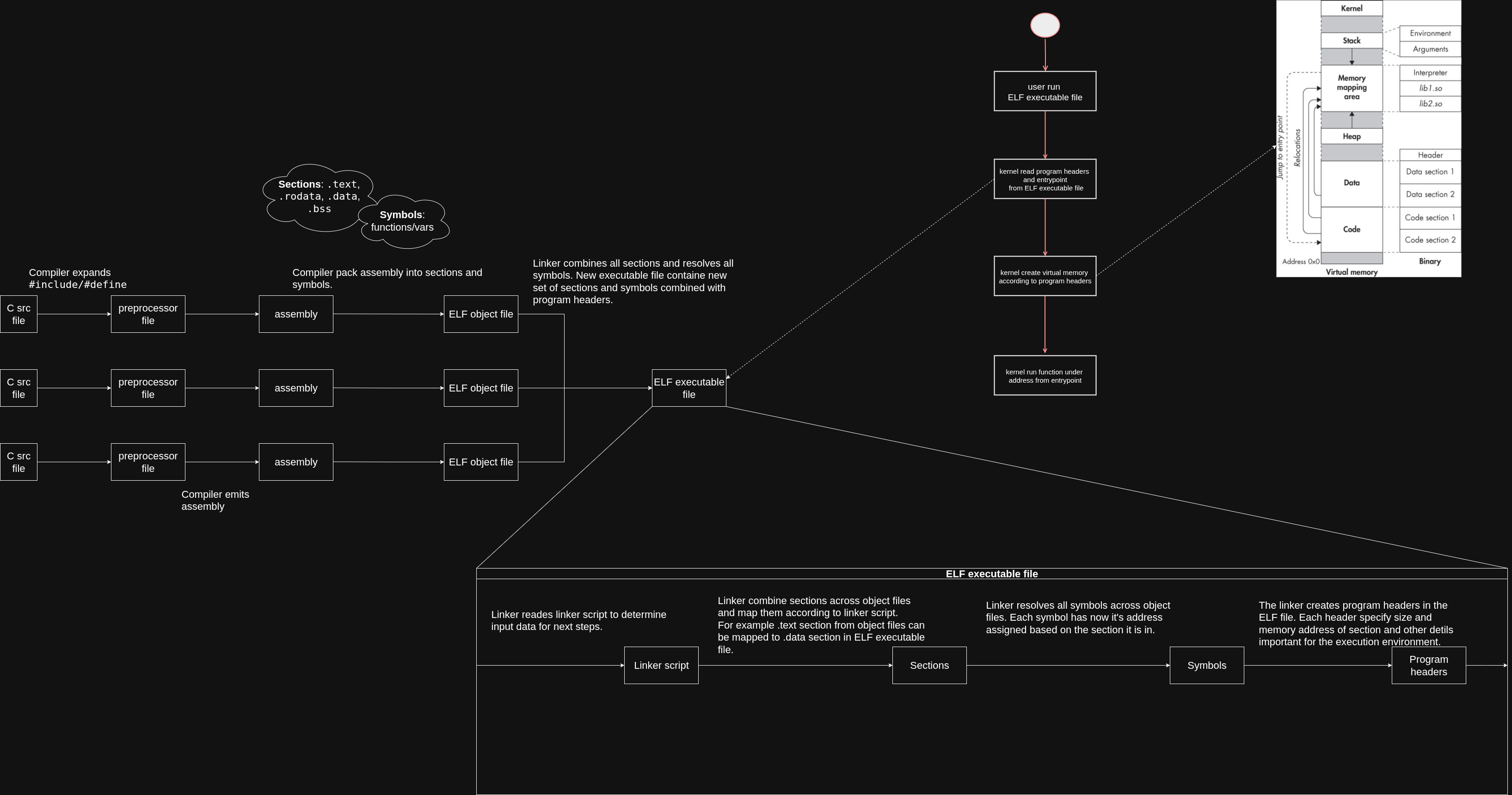
At this point you should understand why const variable is in different virtual memory segment than not const variable and how these segments map to sections and symbols in ELF object files on disk. Ahead of us last part, where we will customize the memory layout of our program to move .data section above the .rodata section and we will change the base virtual address for these sections. Let's end up this part with nice picture wich summarize whole process:
Memory layout customization
Once compiler produces a relocatable file we can influance where sections like .data or .rodata end up in virtual memory, first create file called script.ld:
/* script.ld */
ENTRY(_start)
SECTIONS
{
  . = 0x400000; /* typical ET_EXEC base */
  .text : { *(.text .text.*) *(.plt) }
  . = 0x500000;
  .data : { *(.data .data.*) }
  .bss  : { *(.bss .bss.*) }
  . = 0x600000;
  .rodata : { *(.rodata .rodata.*) *(COMMON) }
}
So let's compile our foo.c with new linker script:
gcc -no-pie foo.c -T script.ld -o foo
We can confirm that memory layout changed:
❯ ./foo
main=0x4000e6
a=0x600004
b=0x500010
It is possible because the program headers of executable changed:
  LOAD           0x0000000000002000 0x0000000000500000 0x0000000000500000
                 0x0000000000000228 0x0000000000000229  RW     0x1000
  LOAD           0x0000000000003000 0x0000000000600000 0x0000000000600000
                 0x00000000000002d8 0x00000000000002d8  R      0x1000
As you can see the .data section is now in segment starting at 0x00500000 when .rodata section is now in segment starting at 0x00600000.
There is much more that one can customize with linker script, if you're interested checkout the webiste that i learned from colorado.edu.
Conclusions
We walked through how C code becomes an ELF file, how sections turn into segments, and how those segments end up in process memory. We saw why const data lands in .rodata, why variables end up in .data or .bss, and how all of this maps into virtual memory at runtime.
Once you understand that, you stop treating memory as “mystery addresses” and start seeing it as a structure you can read, predict, and even shape with linker scripts.
Memory layout in C isn’t random, it’s the result of how ELF files are built, linked, and loaded.